
반응형
Notice
Recent Posts
Recent Comments
Link
| 일 | 월 | 화 | 수 | 목 | 금 | 토 |
|---|---|---|---|---|---|---|
| 1 | 2 | 3 | 4 | 5 | 6 | |
| 7 | 8 | 9 | 10 | 11 | 12 | 13 |
| 14 | 15 | 16 | 17 | 18 | 19 | 20 |
| 21 | 22 | 23 | 24 | 25 | 26 | 27 |
| 28 | 29 | 30 | 31 |
Tags
- security
- CICD
- KISA
- docekr
- IAC
- 보안
- devop
- CI/CD
- Network
- DevSecOps
- eks
- cloiud
- zerotrust
- 클라우드 보안
- VPC
- secretmanager
- docker
- devops
- saa-c03
- git
- ECS
- docker-compose
- fargate
- client-vpn
- AWS
- cloud trail
- cloud
- Container
- kubernetes
- VPN
Archives
- Today
- Total
Devsecops로 발전하는 엔지니어
Gitlab CI/CD를 이용한 ECS배포 -1 (1) 본문
반응형
📁 GitLab 프로젝트 구조
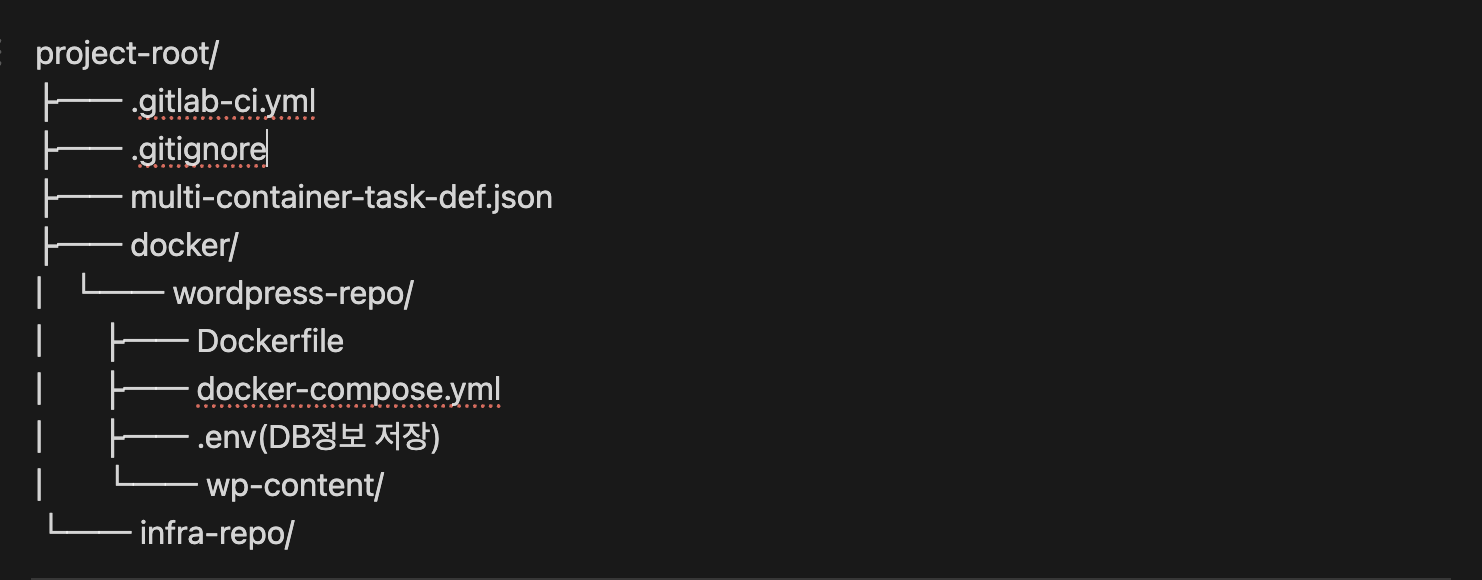
1. Terraform 인프라 구성
주요 리소스
- VPC 및 네트워킹 (Public/Private Subnets)
- ECS Cluster (EC2 Launch Type)
- Application Load Balancer
- Auto Scaling Group (t3.medium × 2)
- IAM Roles 및 Security Groups
# ─────────────────────────────────────────────────────────────
# DevOps 이름지정 Environment - AWS Seoul Region (ap-northeast-2)
# ─────────────────────────────────────────────────────────────

terraform {
  required_providers {
    aws = { source = "hashicorp/aws", version = ">= 5.0" }
  }
}

provider "aws" {
  region = "ap-northeast-2"
}

# ─────────────────────────────────────────────────────────────
# ECR 태그 → 다이제스트 자동 조회 (TF apply 시 새 리비전/롤링 배포 트리거)
# ─────────────────────────────────────────────────────────────
data "aws_caller_identity" "current" {}

variable "ecr_repo" {
  type    = string
  default = "docker-이름지정"
}

variable "image_tag" {
  type    = string
  default = "la이름지정"
}

data "aws_ecr_image" "selected" {
  repository_name = var.ecr_repo
  image_tag       = var.image_tag
}

locals {
  ecr_image = "${data.aws_caller_identity.current.account_id}.dkr.ecr.ap-northeast-2.amazonaws.com/${var.ecr_repo}:la이름지정"
}

# ─────────────────────────────────────────────────────────────
# VPC / Subnets / Routing
# ─────────────────────────────────────────────────────────────
resource "aws_vpc" "devops_이름지정" {
  cidr_block           = "10.100.0.0/16"
  enable_dns_hostnames = true
  enable_dns_support   = true
  tags = { Name = "devops-이름지정-vpc" }
}

resource "aws_subnet" "devops_이름지정_public_subnet1" {
  vpc_id                  = aws_vpc.devops_이름지정.id
  cidr_block              = "10.100.100.0/24"
  availability_zone       = "ap-northeast-2a"
  map_public_ip_on_launch = true
  tags = { Name = "devops-이름지정-public-subnet1" }
}

resource "aws_subnet" "devops_이름지정_public_subnet2" {
  vpc_id                  = aws_vpc.devops_이름지정.id
  cidr_block              = "10.100.101.0/24"
  availability_zone       = "ap-northeast-2b"
  map_public_ip_on_launch = true
  tags = { Name = "devops-이름지정-public-subnet2" }
}

resource "aws_subnet" "devops_이름지정_private_subnet1" {
  vpc_id            = aws_vpc.devops_이름지정.id
  cidr_block        = "10.100.1.0/24"
  availability_zone = "ap-northeast-2a"
  tags = { Name = "devops-이름지정-private-subnet1" }
}

resource "aws_subnet" "devops_이름지정_private_subnet2" {
  vpc_id            = aws_vpc.devops_이름지정.id
  cidr_block        = "10.100.2.0/24"
  availability_zone = "ap-northeast-2b"
  tags = { Name = "devops-이름지정-private-subnet2" }
}

resource "aws_internet_gateway" "devops_이름지정_igw" {
  vpc_id = aws_vpc.devops_이름지정.id
  tags = { Name = "devops-이름지정-igw" }
}

resource "aws_route_table" "devops_이름지정_public_rt" {
  vpc_id = aws_vpc.devops_이름지정.id

  route {
    cidr_block = "0.0.0.0/0"
    gateway_id = aws_internet_gateway.devops_이름지정_igw.id
  }

  tags = { Name = "devops-이름지정-public-rt" }
}

resource "aws_route_table_association" "devops_이름지정_public_rt_assoc1" {
  subnet_id      = aws_subnet.devops_이름지정_public_subnet1.id
  route_table_id = aws_route_table.devops_이름지정_public_rt.id
}

resource "aws_route_table_association" "devops_이름지정_public_rt_assoc2" {
  subnet_id      = aws_subnet.devops_이름지정_public_subnet2.id
  route_table_id = aws_route_table.devops_이름지정_public_rt.id
}

resource "aws_eip" "devops_이름지정_nat" {
  domain = "vpc"
  tags   = { Name = "devops-이름지정-nat-eip" }
}

resource "aws_nat_gateway" "devops_이름지정_nat" {
  allocation_id = aws_eip.devops_이름지정_nat.id
  subnet_id     = aws_subnet.devops_이름지정_public_subnet1.id
  depends_on    = [aws_internet_gateway.devops_이름지정_igw]
  tags          = { Name = "devops-이름지정-nat-gw" }
}

resource "aws_route_table" "devops_이름지정_private_rt" {
  vpc_id = aws_vpc.devops_이름지정.id

  route {
    cidr_block     = "0.0.0.0/0"
    nat_gateway_id = aws_nat_gateway.devops_이름지정_nat.id
  }

  tags = { Name = "devops-이름지정-private-rt" }
}

resource "aws_route_table_association" "devops_이름지정_private_rt_assoc1" {
  subnet_id      = aws_subnet.devops_이름지정_private_subnet1.id
  route_table_id = aws_route_table.devops_이름지정_private_rt.id
}

resource "aws_route_table_association" "devops_이름지정_private_rt_assoc2" {
  subnet_id      = aws_subnet.devops_이름지정_private_subnet2.id
  route_table_id = aws_route_table.devops_이름지정_private_rt.id
}

# ─────────────────────────────────────────────────────────────
# Security Groups
# ─────────────────────────────────────────────────────────────
resource "aws_security_group" "devops_이름지정_bastion_sg" {
  name        = "devops-이름지정-bastion-sg"
  description = "Allow SSH from specific IP"
  vpc_id      = aws_vpc.devops_이름지정.id

  ingress {
    description = "SSH from my IP"
    from_port   = 22
    to_port     = 22
    protocol    = "tcp"
    cidr_blocks = ["ip"]
  }

  egress {
    from_port   = 0
    to_port     = 0
    protocol    = "-1"
    cidr_blocks = ["0.0.0.0/0"]
  }

  tags = { Name = "devops-이름지정-bastion-sg" }
}

resource "aws_security_group" "devops_이름지정_alb_sg" {
  name        = "devops-이름지정-alb-sg"
  description = "Allow HTTP from anywhere"
  vpc_id      = aws_vpc.devops_이름지정.id

  ingress {
    from_port   = 80
    to_port     = 80
    protocol    = "tcp"
    cidr_blocks = ["0.0.0.0/0"]
  }

  egress {
    from_port   = 0
    to_port     = 0
    protocol    = "-1"
    cidr_blocks = ["0.0.0.0/0"]
  }

  tags = { Name = "devops-이름지정-alb-sg" }
}

resource "aws_security_group" "devops_이름지정_ecs_sg" {
  name        = "devops-이름지정-ecs-sg"
  description = "Allow HTTP from ALB, SSH from bastion"
  vpc_id      = aws_vpc.devops_이름지정.id

  ingress {
    from_port       = 22
    to_port         = 22
    protocol        = "tcp"
    security_groups = [aws_security_group.devops_이름지정_bastion_sg.id]
  }

  ingress {
    from_port       = 80
    to_port         = 80
    protocol        = "tcp"
    security_groups = [aws_security_group.devops_이름지정_alb_sg.id]
  }

  ingress {
    from_port       = 8080
    to_port         = 8080
    protocol        = "tcp"
    security_groups = [aws_security_group.devops_이름지정_alb_sg.id]
  }

  egress {
    from_port   = 0
    to_port     = 0
    protocol    = "-1"
    cidr_blocks = ["0.0.0.0/0"]
  }

  tags = { Name = "devops-이름지정-ecs-sg" }
}

# ─────────────────────────────────────────────────────────────
# Bastion (Amazon Linux 2023)
# ─────────────────────────────────────────────────────────────
data "aws_ami" "devops_이름지정_amazonlinux2023" {
  most_recent = true
  owners      = ["137112412989"]

  filter {
    name   = "name"
    values = ["al2023-ami-*-x86_64"]
  }
}

resource "aws_instance" "devops_이름지정_bastion" {
  ami                         = data.aws_ami.devops_이름지정_amazonlinux2023.id
  instance_type               = "t3.nano"
  subnet_id                   = aws_subnet.devops_이름지정_public_subnet1.id
  key_name                    = "docker-bastion"
  vpc_security_group_ids      = [aws_security_group.devops_이름지정_bastion_sg.id]
  associate_public_ip_address = true
  tags = { Name = "devops-이름지정-bastion" }
}

# ─────────────────────────────────────────────────────────────
# ECS Cluster & IAM (EC2 Launch)
# ─────────────────────────────────────────────────────────────
resource "aws_ecs_cluster" "devops_이름지정_cluster" {
  name = "devops-이름지정-cluster"

  setting {
    name  = "containerInsights"
    value = "enabled"
  }

  tags = { Name = "devops-이름지정-cluster" }
}

resource "aws_iam_role" "devops_이름지정_ecs_instance_role" {
  name = "devops-이름지정-ecs-instance-role"

  assume_role_policy = jsonencode({
    Version = "2012-10-17",
    Statement = [{
      Action    = "sts:AssumeRole",
      Effect    = "Allow",
      Principal = { Service = "ec2.amazonaws.com" }
    }]
  })

  tags = { Name = "devops-이름지정-ecs-instance-role" }
}

resource "aws_iam_role_policy_attachment" "devops_이름지정_ecs_instance_role_policy" {
  role       = aws_iam_role.devops_이름지정_ecs_instance_role.name
  policy_arn = "arn:aws:iam::aws:policy/service-role/AmazonEC2ContainerServiceforEC2Role"
}

resource "aws_iam_role_policy_attachment" "devops_이름지정_ssm_policy" {
  role       = aws_iam_role.devops_이름지정_ecs_instance_role.name
  policy_arn = "arn:aws:iam::aws:policy/AmazonSSMManagedInstanceCore"
}

resource "aws_iam_role_policy_attachment" "devops_이름지정_ecr_ro" {
  role       = aws_iam_role.devops_이름지정_ecs_instance_role.name
  policy_arn = "arn:aws:iam::aws:policy/AmazonEC2ContainerRegistryReadOnly"
}

resource "aws_iam_instance_profile" "devops_이름지정_ecs_instance_profile" {
  name = "devops-이름지정-ecs-instance-profile"
  role = aws_iam_role.devops_이름지정_ecs_instance_role.name
}

data "aws_ssm_parameter" "ecs_al2_ami" {
  name = "/aws/service/ecs/optimized-ami/amazon-linux-2/recommended/image_id"
}

resource "aws_launch_template" "devops_이름지정_ecs_lt" {
  name_prefix   = "devops-이름지정-ecs-"
  image_id      = data.aws_ssm_parameter.ecs_al2_ami.value
  instance_type = "t3.medium"
  key_name      = "docker-bastion"

  vpc_security_group_ids = [aws_security_group.devops_이름지정_ecs_sg.id]

  iam_instance_profile {
    name = aws_iam_instance_profile.devops_이름지정_ecs_instance_profile.name
  }

  user_data = base64encode(<<-EOF
    #!/bin/bash
    echo "ECS_CLUSTER=${aws_ecs_cluster.devops_이름지정_cluster.name}" >> /etc/ecs/ecs.config
  EOF
  )

  tag_specifications {
    resource_type = "instance"
    tags = { Name = "devops-이름지정-ecs-instance" }
  }
}

resource "aws_autoscaling_group" "devops_이름지정_ecs_asg" {
  name                        = "devops-이름지정-ecs-asg"
  vpc_zone_identifier         = [aws_subnet.devops_이름지정_private_subnet1.id, aws_subnet.devops_이름지정_private_subnet2.id]
  health_check_type           = "EC2"
  health_check_grace_period   = 300
  protect_from_scale_in       = true
  min_size                    = 2
  max_size                    = 2
  desired_capacity            = 2

  launch_template {
    id      = aws_launch_template.devops_이름지정_ecs_lt.id
    version = "$La이름지정"
  }

  tag {
    key                 = "Name"
    value               = "devops-이름지정-ecs-asg"
    propagate_at_launch = true
  }

  instance_refresh {
    strategy = "Rolling"
    preferences {
      min_healthy_percentage = 90
      instance_warmup        = 120
    }
    triggers = ["launch_template"]
  }
}

resource "aws_ecs_capacity_provider" "devops_이름지정_capacity_provider" {
  name = "devops-이름지정-capacity-provider"

  auto_scaling_group_provider {
    auto_scaling_group_arn         = aws_autoscaling_group.devops_이름지정_ecs_asg.arn
    managed_termination_protection = "ENABLED"

    managed_scaling {
      maximum_scaling_step_size = 2
      minimum_scaling_step_size = 1
      status                    = "ENABLED"
      target_capacity           = 100
    }
  }

  tags = { Name = "devops-이름지정-capacity-provider" }
}

resource "aws_ecs_cluster_capacity_providers" "devops_이름지정_cluster_cp" {
  cluster_name       = aws_ecs_cluster.devops_이름지정_cluster.name
  capacity_providers = [aws_ecs_capacity_provider.devops_이름지정_capacity_provider.name]

  default_capacity_provider_strategy {
    base              = 1
    weight            = 100
    capacity_provider = aws_ecs_capacity_provider.devops_이름지정_capacity_provider.name
  }
}

# ─────────────────────────────────────────────────────────────
# ALB / TargetGroup / Listener
# ─────────────────────────────────────────────────────────────
resource "aws_lb" "devops_이름지정_alb" {
  name               = "devops-이름지정-alb"
  internal           = false
  load_balancer_type = "application"
  security_groups    = [aws_security_group.devops_이름지정_alb_sg.id]
  subnets            = [aws_subnet.devops_이름지정_public_subnet1.id, aws_subnet.devops_이름지정_public_subnet2.id]
  tags = { Name = "devops-이름지정-alb" }
}

resource "aws_lb_target_group" "devops_이름지정_tg" {
  name        = "devops-이름지정-tg"
  port        = 80
  protocol    = "HTTP"
  vpc_id      = aws_vpc.devops_이름지정.id
  target_type = "instance"

  health_check {
    enabled             = true
    healthy_threshold   = 2
    unhealthy_threshold = 2
    timeout             = 5
    interval            = 30
    path                = "/"
    matcher             = "200-399"
    port                = "traffic-port"
    protocol            = "HTTP"
  }

  tags = { Name = "devops-이름지정-tg" }
}

resource "aws_lb_listener" "devops_이름지정_listener" {
  load_balancer_arn = aws_lb.devops_이름지정_alb.arn
  port              = 80
  protocol          = "HTTP"

  default_action {
    type             = "forward"
    target_group_arn = aws_lb_target_group.devops_이름지정_tg.arn
  }
}

# ─────────────────────────────────────────────────────────────
# Task Definition / Service
# ─────────────────────────────────────────────────────────────
resource "aws_iam_role" "devops_task_exec_role" {
  name = "devops-이름지정-ecs-task-exec-role"

  assume_role_policy = jsonencode({
    Version = "2012-10-17",
    Statement = [{
      Effect    = "Allow",
      Principal = { Service = "ecs-tasks.amazonaws.com" },
      Action    = "sts:AssumeRole"
    }]
  })
}

resource "aws_iam_role_policy_attachment" "devops_task_exec_attach" {
  role       = aws_iam_role.devops_task_exec_role.name
  policy_arn = "arn:aws:iam::aws:policy/service-role/AmazonECSTaskExecutionRolePolicy"
}

resource "aws_cloudwatch_log_group" "devops_이름지정_log_group" {
  name              = "/ecs/devops-이름지정-task"
  retention_in_days = 7
  tags = { Name = "devops-이름지정-log-group" }
}

resource "aws_ecs_task_definition" "devops_이름지정_task" {
  family                   = "devops-이름지정-task"
  network_mode             = "bridge"
  requires_compatibilities = ["EC2"]
  cpu                      = "256"
  memory                   = "512"
  execution_role_arn       = aws_iam_role.devops_task_exec_role.arn

  container_definitions = jsonencode([
    {
      name      = "devops-이름지정-container",
      image     = local.ecr_image,
      cpu       = 256,
      memory    = 512,
      essential = true,
      portMappings = [
        {
          containerPort = 80,
          hostPort      = 80,
          protocol      = "tcp"
        }
      ],
      logConfiguration = {
        logDriver = "awslogs",
        options = {
          awslogs-group         = "/ecs/devops-이름지정-task",
          awslogs-region        = "ap-northeast-2",
          awslogs-stream-prefix = "ecs"
        }
      }
    }
  ])

  tags = { Name = "devops-이름지정-task" }
}

resource "aws_ecs_service" "devops_이름지정_service" {
  name            = "devops-이름지정-service"
  cluster         = aws_ecs_cluster.devops_이름지정_cluster.id
  task_definition = aws_ecs_task_definition.devops_이름지정_task.arn
  desired_count   = 2

  capacity_provider_strategy {
    capacity_provider = aws_ecs_capacity_provider.devops_이름지정_capacity_provider.name
    weight            = 100
  }

  load_balancer {
    target_group_arn = aws_lb_target_group.devops_이름지정_tg.arn
    container_name   = "devops-이름지정-container"
    container_port   = 80
  }

  depends_on = [
    aws_lb_listener.devops_이름지정_listener,
    aws_ecs_cluster_capacity_providers.devops_이름지정_cluster_cp
  ]

  # 필요 시 주석 해제하여 매 apply 때 강제 롤링
  # force_new_deployment = true

  tags = { Name = "devops-이름지정-service" }
}

# ─────────────────────────────────────────────────────────────
# Outputs
# ─────────────────────────────────────────────────────────────
output "bastion_public_ip" {
  description = "Bastion 서버의 Public IP"
  value       = aws_instance.devops_이름지정_bastion.public_ip
}

output "alb_dns_name" {
  description = "Application Load Balancer DNS 이름"
  value       = aws_lb.devops_이름지정_alb.dns_name
}

output "alb_url" {
  description = "Application Load Balancer URL"
  value       = "<http://$>{aws_lb.devops_이름지정_alb.dns_name}"
}

output "vpc_id" {
  description = "VPC ID"
  value       = aws_vpc.devops_이름지정.id
}

output "private_subnet_cidrs" {
  description = "Private Subnet CIDR 블록들 (ECS 인스턴스 IP 범위)"
  value = [
    aws_subnet.devops_이름지정_private_subnet1.cidr_block,
    aws_subnet.devops_이름지정_private_subnet2.cidr_block
  ]
}

output "ssh_connection_guide" {
  description = "SSH 접속 가이드"
  value = <<-EOT
    1) Bastion 접속:
       ssh -i .pem ec2-user@${aws_instance.devops_이름지정_bastion.public_ip}

    2) ECS 인스턴스 접속 (ProxyJump 예시):
       ssh -J ec2-user@${aws_instance.devops_이름지정_bastion.public_ip} -i <ecs.pem> ec2-user@<ECS_PRIVATE_IP>

    3) 웹 서비스 확인:
       <http://$>{aws_lb.devops_이름지정_alb.dns_name}
  EOT
}
cd /infra
terraform init // terraform 구성 파일이 포함된 작업 디렉토리 초기화.
terraform plan // terraform 실행 계획
terraform apply // terraform 배포
이렇게 하면 terraform으로 aws vpc/ecs/lb다 세팅이 완료됨
반응형
'Devops' 카테고리의 다른 글
| ECS Multi-container CI/CD 파이프라인 구축 삽질기: 실수에서 배운 교훈 (1) | 2025.09.04 |
|---|---|
| Gitlab CI/CD를 이용한 ECS배포 -2 (0) | 2025.09.03 |
| Blue/Green 배포 (6) | 2025.08.28 |
| 🌐 AWS EC2 + GitHub Actions + Docker 기반 CI/CD 구축기 (1) | 2025.06.18 |
| Docker 교육 자료 -2 (0) | 2025.06.12 |
'Devops' Related Articles
more
